Qubo embedding
import torch

from qubosolver.config import EmbeddingConfig, SolverConfig
from qubosolver.solver import QUBOInstance, QuboSolver
from qoolqit import AnalogDevice, DigitalAnalogDevice
import matplotlib.pyplot as plt
plt.rcParams["animation.html"] = "jshtml"
import warnings
warnings.filterwarnings("ignore", module="matplotlib")

%matplotlib inline
Embeddings
When using quantum approaches, we have to define a map from the instance variables to atoms on a quantum device. We call this step an embedding. This tutorial aims to show small code snippet on how to use the different embedding methods (blade, custom, greedy) as well as how to parametrize the algorithms through the SolverConfig according to a given QUBO matrix.
# import QUBO matrix manually
coefficients = torch.load("qubo_size_15.pt", weights_only=True)
instance = QUBOInstance(coefficients)
- Define a
SolverConfigto be passed to any solver
config = SolverConfig(use_quantum=True)
For now, the SolverConfig contains parameters according to all available procedures (pre-post processing, embedding, ...). It has a default behavior that is compliant to the minimum requirements to run the workflow, as long as the given QUBO matrix fits with these default paremeters.
If one want to access to the default attributes, it is easily readable through the following:
config.print_specs()
config_name: ''
use_quantum: True
embedding: {'embedding_method': <EmbedderType.GREEDY: 'greedy'>, 'draw_steps': False, 'animation_save_path': None, 'greedy_layout': <LayoutType.TRIANGULAR: <class 'pulser.register.special_layouts.TriangularLatticeLayout'>>, 'greedy_traps': 1, 'greedy_spacing': 4.0, 'greedy_density': None}
drive_shaping: {'drive_shaping_method': <DriveType.ADIABATIC: 'adiabatic'>, 'dmm': True}
classical: {'classical_solver_type': 'cplex', 'cplex_maxtime': 600.0, 'cplex_log_path': 'solver.log'}
backend: <qoolqit.execution.backends.LocalEmulator object at 0x12727b190>
device: DigitalAnalogDevice
do_postprocessing: False
do_preprocessing: False
activate_trivial_solutions: True
- Define a
QuboSolver, by passing the instance and the defined configuration
solver = QuboSolver(instance, config)
- Call the embedding method according to the provided set of parameters defined by the
SolverConfig.
register = solver.embedding()
From the chosen embedding method, we get a set of two-dimensional coordinates that should be embeddable on the register:
register.draw()

BLaDE parametrization
Following previous workflow, we can reiterate using a more fined parametrization of the SolverConfig for the blade embedding method.
Here is a code snippet of an arbitrary parametrization of BLaDE using multiple layers of $n$-dimension and a number of steps per round (i.e. number of iteration per layer):
blade_settings = EmbeddingConfig(embedding_method="blade", blade_dimensions=[5 ,4, 3, 2], blade_steps_per_round=300)
blade_config = SolverConfig.from_kwargs(
    use_quantum=True,
    device=AnalogDevice(),
    embedding=blade_settings,
)

solver = QuboSolver(instance, blade_config)
register = solver.embedding()
register.draw()

Greedy embedder parametrization
We do the same using the greedy embedding method, using a triangular lattice layout on a DigitalAnalogDevice with a number of greedy_traps at least equal to the number of variables in the QUBO:
greedy_settings = EmbeddingConfig(embedding_method="greedy", greedy_layout="triangular", greedy_traps=instance.size)

greedy_config = SolverConfig.from_kwargs(
    use_quantum=True,
    device=AnalogDevice(),
    embedding=greedy_settings,
)

solver = QuboSolver(instance, greedy_config)
register = solver.embedding()
register.draw()

Custom embedder
If one desires to develop his own embedding method, a subclass of qubosolver.pipeline.embedder.BaseEmbedder should be implemented with a mandatory embed method.
The embed method def embed(self) -> qoolqit.Register specify how the problem is mapped into a register of qubits when running using a quantum device. Let us show a simple example where each variable $i$ is mapped into a qubit lying on a horizontal line (with coordinates $[i, 0]$, $i$ normalized by the device specs).
import typing
from qubosolver.pipeline.embedder import BaseEmbedder
from qoolqit import Register
from qubosolver.config import SolverConfig

class FixedEmbedder(BaseEmbedder):

    @typing.no_type_check
    def embed(self) -> Register:
        # note `self._distance_conversion` is used to normalize coordinates to fit a device
        qubits = {f"q{i}": (i / self._distance_conversion ,0) for i in range(self.instance.coefficients.shape[0])}
        register = Register(qubits)
        return register


custom_config = SolverConfig.from_kwargs(
    use_quantum=True,
    embedding_method=FixedEmbedder,
)
solver = QuboSolver(instance, custom_config)
register = solver.embedding()
register.draw()

Greedy algorithm - Vizualisation
from qubosolver.solver import QUBOInstance, QuboSolver
from qubosolver.config import SolverConfig, EmbeddingConfig
import torch

Q = torch.tensor([
    [-4.0, 1.0, 2.0, 1.5, 2.3, 0.9, 1.8, 2.7, 1.2],
    [ 1.0,-3.2, 1.7, 2.1, 0.8, 1.9, 2.2, 1.1, 1.6],
    [ 2.0, 1.7,-5.1, 0.7, 2.5, 1.3, 2.6, 1.4, 2.0],
    [ 1.5, 2.1, 0.7,-2.7, 1.2, 2.4, 0.6, 1.8, 2.1],
    [ 2.3, 0.8, 2.5, 1.2,-6.3, 1.0, 1.7, 2.8, 1.5],
    [ 0.9, 1.9, 1.3, 2.4, 1.0,-4.5, 2.3, 1.6, 0.9],
    [ 1.8, 2.2, 2.6, 0.6, 1.7, 2.3,-3.8, 1.2, 2.2],
    [ 2.7, 1.1, 1.4, 1.8, 2.8, 1.6, 1.2,-5.9, 1.4],
    [ 1.2, 1.6, 2.0, 2.1, 1.5, 0.9, 2.2, 1.4,-2.4],
], dtype=torch.float32)

instance = QUBOInstance(Q)

greedy_settings = EmbeddingConfig(
    embedding_method="greedy",
    greedy_layout="triangular",  # or "square"
    greedy_traps=instance.size + 6,
    greedy_spacing=5.0,
    draw_steps=True,                         # ← single toggle
    animation_save_path="greedy_demo.gif",   # ← optional file export
)

cfg = SolverConfig.from_kwargs(
    use_quantum=True,
    embedding=greedy_settings,
    device=AnalogDevice(),
)

solver = QuboSolver(instance, cfg)
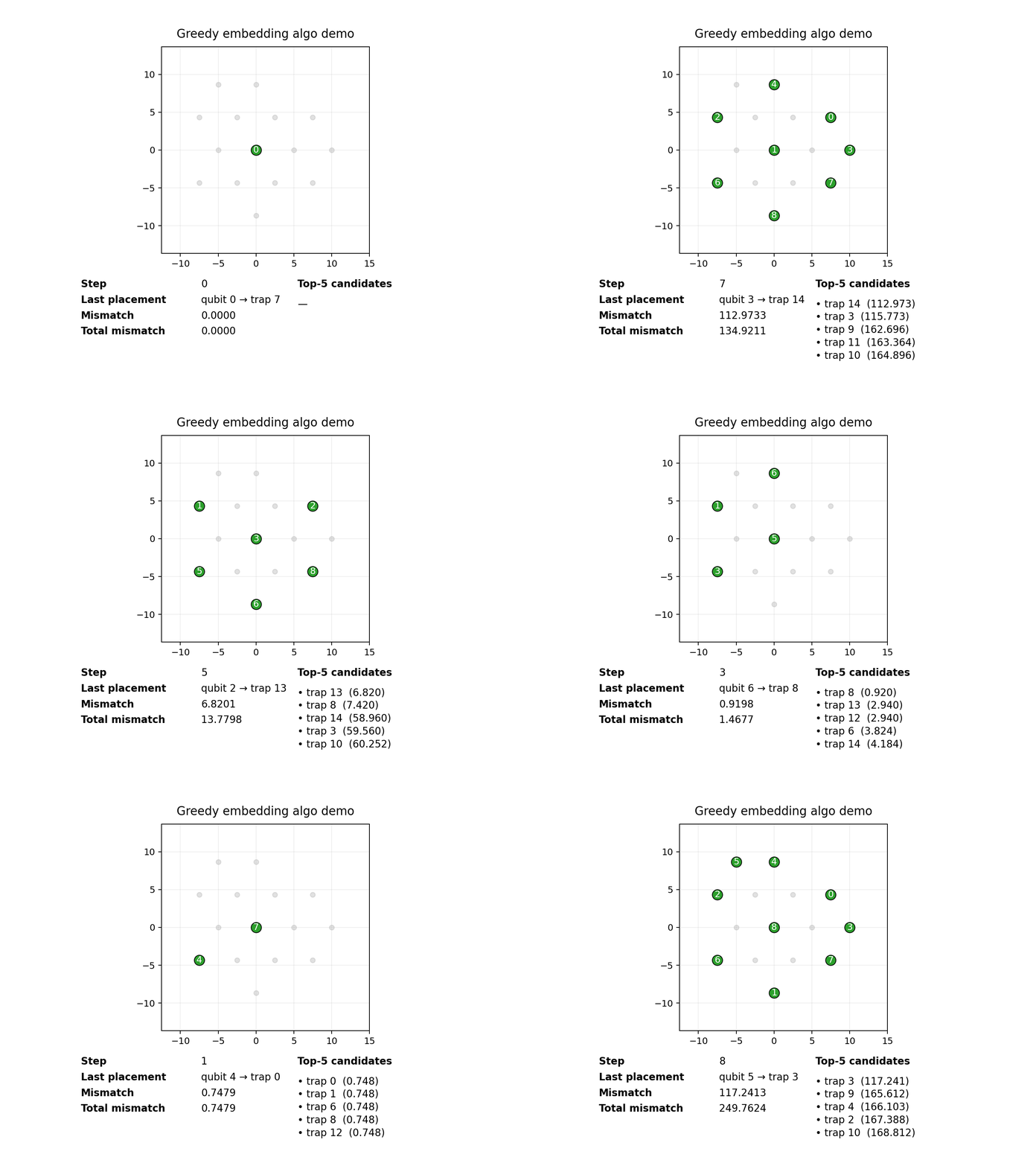
geometry = solver.embedding()     # → inline animation + optional mp4
Animation.save using <class 'matplotlib.animation.PillowWriter'>
[anim] GIF saved to: greedy_demo.gif
Animation.save using <class 'matplotlib.animation.HTMLWriter'>
The above should display an animation inline: