Compiling a Quantum Program
Before reading this page, we suggest starting with the Get Started: Programming a Neutral Atom QPU guide, which introduces the QoolQit dimensionless model and provides a first insight into compilation.
On this page, you will learn about:
- Compilation profiles: default and maximum energy
- Hardware modulation and noise emulation
Compiling a quantum program
QoolQit programs are written in dimensionless units, allowing the same program to be compiled and executed on any compatible quantum hardware. As a reminder, the compilation process:
- Converts all of the program's dimensionless parameters, times, energies, and distances into their physical equivalents.
- Generates a Pulser
Sequencecontaining the low-level instructions for QPU execution.
The conversion rules ensure that the dimensionless Hamiltonian \(\tilde{H}(\tilde{t})\) and the physical Hamiltonian \(H(t)\) produce identical unitary evolution. For a complete mathematical derivation, see the Get Started: Programming a Neutral Atom QPU page.
The essential conversion relationships are:
Compiling a QoolQit program to a particular device will set the conversion factor, \(J_{\max}^{d}=C_6/(r_{\min}^{d})^6\), which sets the scales for amplitude, detuning, runtime, and atom spacing all at once. It is important to note that this constant depends on the particular hardware of choice, since \(C_6\) is an interaction coefficient that depends on the specific Rydberg level of a specific atomic species used in the QPU, while \(r_{\min}^{d}\) is the minimum pairwise distance that can be realized.
Finally, when a program is compiled, the compilation output is stored internally as a Pulser Sequence1, which contains the instructions for QPU execution.
Compilation profiles
At the moment, QoolQit provides two compilation profiles: default and maximum energy. Usage and examples can be found in the Devices and Compilation page of this documentation.
As anticipated, a program needs to be compiled to a particular device, whose hardware constraints limit the range of parameters in a program. The two most important ones for compilation are the maximum drive amplitude \(\Omega_{\max}^{d}\) and the maximum interaction energy \(J_{\max}^{d}\), or equivalently, the minimum atom spacing \(r_{\min}^{d}\). In the following, for simplicity, we will represent an input program and its hardware constraints in the \((\tilde{\Omega}, \tilde{J})\) plane.
Default
The default compilation converts dimensionless quantum program parameters to physical values using the conversion relationships described above in the Compiling a quantum program section. In this profile users have direct control over the exact physical values of drive amplitude, detuning, atom distances, and execution time, while staying within hardware limits.
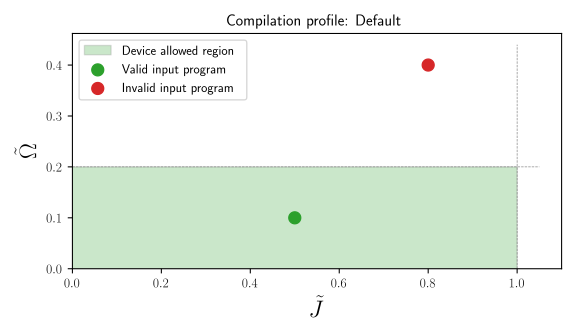
As shown in the image above, an input program can be represented as a point in the \((\tilde{\Omega}, \tilde{J})\) plane, while the green box highlights the valid parameter region for the interaction energy \(\tilde{J}_{ij}\) and the driving amplitude \(\tilde{\Omega}\). For example, since the minimum distance in the dimensionless model is one, it will be converted to the minimum distance on the hardware device. In other words, an input program that satisfies the hardware constraints (green point in the green region of the plot) will be successfully compiled, while compiling an input program whose parameters lie outside of the device specs (red point) will raise a detailed error.
To review your device's hardware constraints and capabilities, see Devices and Compilation.
Maximum energy
In addition to dimensionalization, every rescaling \(\left(t, H\right) \rightarrow \left(t/\alpha, \alpha H\right)\) will, in theory, produce a physically equivalent program.
The maximum energy profile always picks the largest energy scale that satisfies these hardware constraints, which guarantees the most efficient use of the hardware. Indeed, a larger reference scale realizes the same dimensionless program with a higher drive amplitude (higher signal-to-noise ratio), a shorter physical runtime (less noise), and shorter distances between atoms (more compact registers, hosting more atoms/qubits).
The following figure illustrates two key scenarios:
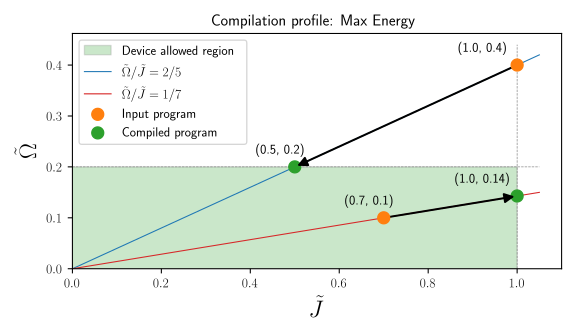
As before, the green box highlights the valid parameter region for the interaction energy \(\tilde{J}_{ij}\) and the driving amplitude \(\tilde{\Omega}\). As described in the QoolQit model page, the interaction energy is bounded by 1 by construction: QoolQit's adimensionalization enforces \(\tilde{J}_{ij} = J_{ij}/J_{\max}^{d} \leq 1\) across all devices. The driving amplitude (more precisely, its maximum over time) is instead constrained to a device-dependent upper bound. In this example, we take \(\Omega_{\max}^{d}/J_{\max}^{d} = 0.2\), so that \(\tilde{\Omega} = \Omega/J_{\max}^{d} \lesssim 0.2\).
The key idea is that the program is defined by ratios, not by absolute scales. For example, fixing the ratio \(\max_{\tilde{t}}\tilde{\Omega}/\tilde{J}\) defines a line in the \((\tilde{J},\tilde{\Omega})\) plane. Moving along this line changes the overall scale of the program, but preserves its dimensionless structure (here \(\max_{\tilde{t}}\) stands for the maximum over time).
For simplicity, we define two programs by specifying the maximum amplitude in time \(\max_{\tilde{t}}\tilde{\Omega}\) and the interaction between nearest neighbor atoms in the register \(\tilde{J}\):
- \((\tilde{J},\max_{\tilde{t}}\tilde{\Omega}) = (1,0.4)\),
- \((\tilde{J},\max_{\tilde{t}}\tilde{\Omega}) = (0.7,0.1)\)
The lines correspond to the programs with fixed ratio \(\tilde{\Omega}/\tilde{J}=2/5\) and \(\tilde{\Omega}/\tilde{J}=1/7\). At compilation, QoolQit checks the energy ratio against the device's valid region and rescales the program to maximize \(\tilde{\Omega}\) within that region.
-
The point \((1,0.4)\) is outside the valid region, because the drive amplitude is too large. To compile the program, QoolQit rescales it while preserving the ratio \(\max_{\tilde{t}}\tilde{\Omega}/\tilde{J} = 2/5\). In this regime the compiled program runs at maximum device amplitude, and the physical atom spacings are larger than the device minimum.
-
The point \((0.7,0.1)\) is inside the valid region, but the drive amplitude can be larger. QoolQit rescales it to the maximum possible \(\tilde{\Omega}\) while preserving the ratio \(\max_{\tilde{t}}\tilde{\Omega}/\tilde{J} = 1/7\). In this regime the compiled register uses the smallest physical spacing the device allows, and the resulting amplitude is below \(\Omega_{\max}\).
The dimensionless content is unchanged: the ratio between drive and interaction is the same, and therefore the underlying physics encoded in the program is the same.
Hardware effects
Real quantum hardware introduces deviations between the ideal compiled program and its actual execution. These effects can be categorized into two main classes: hardware modulation and noise sources. Importantly, in both cases, these effects can be included by configuring emulators, as detailed in the Execution page of this documentation.
Hardware modulation
Hardware modulation arises from the finite bandwidth limitations of optical channels, such as the lasers that drive qubits in neutral atom QPUs. When waveforms contain sharp features (like steps or rapid transitions), the hardware's bandwidth constraints will smooth out these abrupt changes during actual laser pulse execution. This smoothing can alter the intended pulse shape and timing, potentially affecting the quantum operation's fidelity.
The net effect on the drive is always visible when inspecting the compiled sequence in a program, as shown in Devices and Compilation. Moreover, to account for hardware modulation during the emulation of a program, emulators must be configured with the flag with_modulation=True, as described in Execution.
Noise
Noise sources encompass various forms of environmental and systematic errors that introduce unwanted fluctuations or systematic shifts in the quantum system parameters during execution.
As before, to include noise sources in the emulation of a program, emulators must be configured with the flag noise_model, as described in Execution.
Finally, for more detailed information on hardware modulation and noise sources, consult the comprehensive discussions available in the Pulser documentation.
-
Pulser is an open-source library that provides tools for designing and running pulse sequences on programmable neutral atom arrays. For more details about Pulser's scope and capabilities, visit Pulser documentation. ↩